


Mirror: Emoji maker, Stickers
4.35.60K Reviews
App Specs
- Version
- 1.35.16
- Updated On
- License
- Free
- Downloads
- 10,000,000+
- Developer
- Mirror AI
- Categories
- Personalization
- Platform
- Android
Screenshots

 Analysis by AppCompare
Ever wished you could create your own custom emojis and stickers? Well, that's exactly what Mirror: Emoji maker, Stickers lets you do, and trust me, it's a game-changer for the emoji lovers out there.
The personal touch behind a custom emoji
The appeal here is not simply having another collection of pictures to send. Mirror, made by Mirror AI, is a personalization app built around turning a face into a recognizable character for chats. That gives the idea a different feel from choosing a standard emoji or downloading a general sticker pack: the image can stand in for you, rather than just illustrate a mood.
That distinction is most useful in conversations where your usual text feels flat. A familiar cartoon-like version of yourself can make a quick hello, reaction, or joke feel more personal without requiring you to write a longer message. I would think of Mirror as a way to add a small visual signature to everyday messaging, not as a replacement for the emoji keyboard you already use.
It is free to install, which makes it easy to try the basic idea before deciding whether it suits your habits. Some purchases are offered in the app, with listed item prices ranging from $3.99 to $44.99, so I would check what is included before paying rather than assume every customization is part of the free experience. It is rated for Everyone 10+, a useful detail for families considering a personalization app for younger users.
Customize Your World with Mirror
So, imagine this: you’re texting your friends and you just can’t find the right emoji to express your mood. Enter Mirror: Emoji maker, Stickers. This app is all about giving you the freedom to create personalized emojis that look just like you—or however you want them to look.
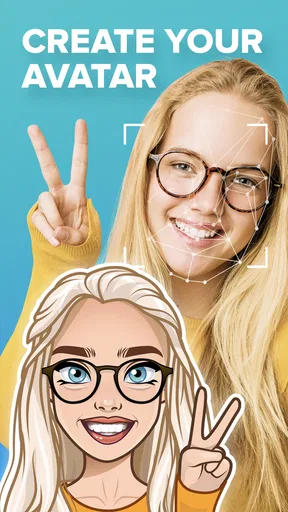
The first thing you’ll notice when you open the app is its sleek and intuitive design. It’s like it was made for people like us who don’t want to spend hours trying to figure things out. You just snap a selfie, and the app automatically generates a set of emojis based on your face. It’s actually pretty impressive how accurate it is!
Unleash Your Creativity
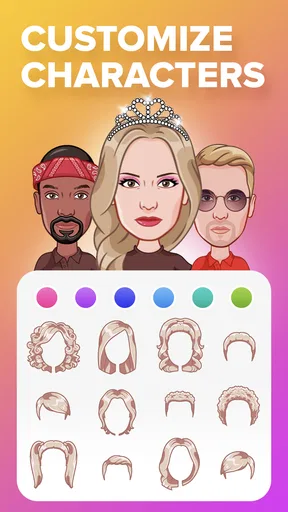
Now, here’s where things get really fun. You can tweak your emojis to your heart's content. Want to add a funky hat or a pair of cool shades? No problem. The app offers a wide range of customization options. From hairstyles and accessories to different facial expressions, the possibilities are endless.
Worth Reading Before You Choose

EA SPORTS FC Mobile 26 Is a Bigger Football Game, but It Takes Time

Flipboard Shows What News Apps Must Do Beyond the Feed

Switching to Android Auto Means Rethinking Your Driving Routine

Google Calendar Makes a Crowded Week Easier to Manage

Ludo King Makes the Most of the Minutes Between Plans

Baby Panda World Brings Quick Play to Modern Phones, but Its Game Library Feels Busy
There’s something incredibly satisfying about seeing an emoji version of yourself doing a silly dance or making a goofy face. It’s like having your own mini-me in the digital world. Plus, it’s a great conversation starter!
Sticker Pack Galore
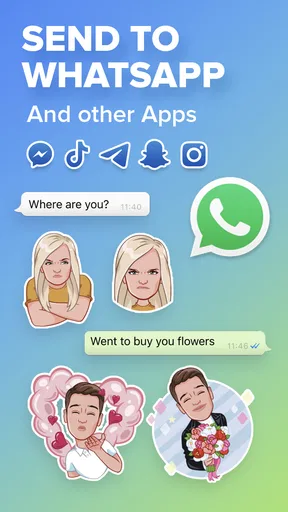
Aside from emojis, you can also create sticker packs. Whether it’s for sharing with friends or just spicing up your own chats, these stickers are a blast to make and use. You can even share them directly through your messaging apps, which is super convenient.
"The sticker packs are perfect for personalizing my conversations, and my friends love them!"
Using the character in a real conversation
A practical way to get value from a personalized avatar is to choose a few expressions you naturally use, then bring them into conversations where a quick reaction is enough. For example, if a friend sends a photo in a group chat, a playful sticker can respond without interrupting the flow with a separate explanation. The benefit is strongest when the people you message recognize the character as yours; if they do not, the image may read as just another sticker.
I would also keep the set focused. A handful of expressions that match your usual tone is often more useful than sending every available design. That makes it easier to find the right reaction when you are typing quickly, and it helps your visual style feel consistent instead of turning each chat into a random collection of images.
Easy Sharing and Compatibility
One of the best features is how easily the app integrates with your favorite messaging platforms. Whether you’re on WhatsApp, Facebook Messenger, or even iMessage, Mirror: Emoji maker, Stickers has got you covered. Sharing your creations is as easy as a tap, and it adds a personal touch to your conversations that standard emojis just can’t match.
And let’s not forget about the app's compatibility. Whether you’re using it on Android or iOS, the user experience is smooth and seamless. No hiccups, just pure emoji-making joy.
When a sticker maker is the better fit
Compared with the usual alternatives, Mirror’s defining difference is the personal avatar angle. A standard emoji keyboard is quicker when you only need a familiar symbol, while a general sticker library can be more convenient when you want varied artwork without building a character around yourself. Mirror makes more sense if you enjoy seeing your own look turned into expressive chat images and expect to reuse them.
That trade-off matters if you rarely send stickers or prefer a minimal keyboard. Creating a character can be fun, but it adds a step that a regular emoji does not require. If speed and a broad set of ready-made symbols are your priorities, the keyboard already built into your phone may be the better everyday choice. If you want personalized reactions, Mirror has a clearer reason to stay installed.
Small choices that make the workflow easier
When making a character from a selfie, I would choose a clear, straightforward photo and check the result before spending time customizing details. A good starting likeness makes later edits feel worthwhile; if the base face does not resemble you enough, accessories may not solve that. It is also worth thinking about how the character will look at sticker size: details that seem obvious on a large preview can become hard to notice in a chat.
Another useful habit is to decide what you want the set to do before making lots of variations. If you mainly want reactions for friends, prioritize expressions that work in quick back-and-forth messages. If you want a recognizable personal avatar, consistency in the look may matter more than having a different outfit or accessory for every situation. This keeps the customization tied to a real use rather than becoming an endless editing session.
Sharing is convenient, but the value still depends on the messaging apps and conversations you actually use. Before building a large collection, try sending a small number of creations in your usual chats and see whether they display and feel natural there. That simple test answers a practical question: will these stickers become part of your routine, or will you enjoy making them more than using them?
Who is likely to enjoy it
Mirror is best suited to people who already like expressive messaging and are happy to spend a little time making their digital reactions feel personal. It can also be a fun choice for friends who share inside jokes, since a familiar avatar can give those jokes a visual shorthand. The app has an average rating of 4.3 from around 176,000 ratings, with about 5,600 written reviews, and has passed 10 million installs—signs that the avatar-and-sticker idea has found a substantial audience, though they do not guarantee that its style will suit everyone.
Someone who only sends an occasional text, dislikes cartoon versions of themselves, or wants a keyboard that is purely functional may not get enough use from it. I would also be cautious about paying for extra items until I had tried the free experience and knew which parts I would actually use. The app’s current version is 1.35.16, and it requires Android 9 or later on Android devices; people using older Android software should check compatibility before planning around it.
The Verdict
Overall, if you’re someone who loves to add a personal flair to your digital communications, then Mirror: Emoji maker, Stickers is definitely worth checking out. It’s user-friendly, packed with features, and most importantly, it’s just plain fun. It brings a whole new level of expression to your fingertips.
So go ahead, give it a try. Create emojis that truly reflect who you are and watch as your chats fill with personality and fun. You might just find yourself wondering how you ever lived without it!
Pros
- Highly customizable emoji options.
- Intuitive and user-friendly interface.
- Wide variety of sticker packs.
- Regular updates with new features.
- Works offline without issues.
Cons
- Limited free features
- many require purchase.
- Occasional lag on older devices.
- Some ads can be intrusive.
- Minor bugs in face recognition.
- Limited export options for other apps.
FAQs for Mirror: Emoji maker, Stickers
What is Mirror: Emoji Maker, Stickers?
Mirror: Emoji Maker, Stickers is a creative app that allows users to generate personalized emojis and stickers. By using facial recognition technology, the app can create emojis that closely resemble your facial features, offering a fun and unique way to express yourself in chats and messages.
How does the app create personalized emojis?
The app utilizes advanced facial recognition technology to scan a user's facial features. After taking a selfie, Mirror: Emoji Maker analyzes the image and generates custom emojis that mimic the user's appearance. This process ensures that the emojis are not only unique but also a reflection of the user's personality.
Is Mirror: Emoji Maker, Stickers free to use?
Mirror: Emoji Maker, Stickers offers a free version with basic features. However, it also provides in-app purchases and subscription options for users who want to access premium features, such as additional emoji packs and customization tools. This allows users to enhance their creative experience.
What are the main features of Mirror: Emoji Maker, Stickers?
The app offers a variety of features, including personalized emoji creation, a wide range of sticker options, and easy integration with messaging apps. Users can also customize their emojis with different hairstyles, accessories, and expressions, making it a versatile tool for personal expression in digital communication.
Is the app compatible with all devices?
Mirror: Emoji Maker, Stickers is available for both Android and iOS devices. However, it requires a smartphone with a front-facing camera to capture selfies and generate personalized emojis. It's important to check the app store for specific compatibility details related to your device model and operating system version.


